GD32 Embedded Builder
Jump to navigation
Jump to search
GD32 Embedded Builder is a J-Link compatible 3rd party IDE that supports most J-Link features.
Usually it is not necessary to separately install the J-Link software and documentation package.
Anyhow, we recommend installing the latest version of the J-Link software and make sure that DLL is used.
Creating a new project
In this example we will use GD32 Embedded Builder's Code Generation feature, which automatically creates projects and code for a list of GD32 devices.
- Click File -> New -> Project.
- Select GD32 Project and click Next >.

- Enter a project name and click Next >.
- Select the desired MCU and click Finish.

- Configure the peripherals, clock and other options to your liking.
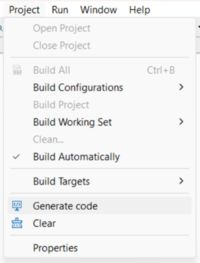
- Click Project -> Generate Code.
- Follow the steps described in Using J-Link with an exisiting project


Using J-Link with an exisiting project
- Build the project.
- Press Ctlr+B or click the hammer symbol to do so.
- Configure a debug configuration for J-Link usage
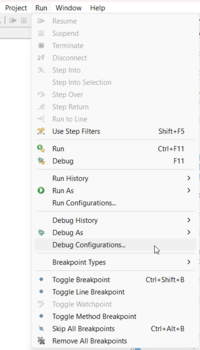
- Open the debug configurations via Run -> Debug Confiugrations
- Right click GDB General Debugging and click New Configuration

- In the "Main" tab make sure the compiled application was detected.

- In the "Debugger" tab:
- Select Debugger: J-Link
- Make sure the target device was selected correctly. If unsure, a complete list of supported device names can be found at segger.com
- Make sure the J-Link GDB Server command line tool path is correct.
- We recommend installing the current version of the J-Link software and documentation package and using the path to that installation of the J-Link GDB Server command line tool.
- Press Apply and Close'.

- Open the debug configurations via Run -> Debug Confiugrations


From now on you can click the bug-symbol or press F11 to start a debugging sessions.
